Path Social Media App Debuts on Windows Phone

The number of social media platforms and apps are inexhaustible thy are so much you get confused on which one to really buy into. However, the likes of Facebook, Twitter and Instagram are easy to just buy into due to their popularity among other things.


Path may not be as popular as Facebook, Twitter etc yet its quite interesting to see quite a few people on the platform. Path which was launched in 2010 is a social media platform for sharing images and messages.

Path app which is already available for iOS and Android for quite some time now is now finally available for Windows Phone devices.


Just like the Path app for iOS and Android, the Windows Phone version maintains the charm, design and stability. The design fits well to the square form of the Windows Phone and everything just works as it should.

If you would like to get the app which is in its beta phase, follow the download link just below and you would be fine.


Like our Facebook page and follow us on Twitter for more smartphone news and app downloads.
Read More..

Windows Phone Italys Facebook page reveals WP7 8 features

The big Microsoft event came and went and there wasn’t even a word about Windows Phone 7.8. Joe Belfiore and co didn’t even announce a date when the update will be released, but it will probably be a while after WP8 hits the shelves (which is already happening).


Whoever is managing the Windows Phone Italia Facebook page was more talkative, however, and answered a question from a fan, revealing the new features that v7.8 will bring. The response has been deleted since.

The list includes the new homescreen (which we already knew), something called Club, which we guess is Rooms, Xbox Music and SmartGlass.

Facebook is hardly a reliable source of info, but the features listed seem quite probable - we already know about the homescreen, Rooms and SmartGlass are available for other OSes too, so its unlikely they will be excluded from WP7.8 and Xbox Music will bring the existing user base to Microsofts new music service.

In case you dont know yet, Windows Phone 7.8 will be released for 7 and 7.5 devices, as the old hardware wont get updated to WP8.

Source (in Italian) | Via

Adminss Note:
Here is the post translated to English
"The upgrade to 7.8 will be available for versions 7.0 and 7.5 shortly after the marketing of the devices Windows Phone 8.
Among the features are the new Start screen, the sharing of the calendar using the function Club and access to key Microsoft services and content, including Xbox Music Store library that can be enjoyed by Zune and Xbox SmartGlass.
Continue to follow us for all other news!"
Read More..

How to Install Viber on Windows and MacOS Computer


Installing Viber on Windows and MacOS computer is pretty very easy and straight forward much like the mobile versions on Android, iOS and Windows Phone.

I would not be wrong to say that Viber needs little or no introduction at all owing to its huge success and popularity and have taken over other VoIP apps by storm and currently giving Skype a good competition.

Just as Skype is available for PC and mobile devices for all platforms, so also is Viber available cross platform on all PC and mobile devices and allows you to send free text messages and calls to other Viber users.
However, unlike Skype which you need to register with your email and a password,Viber do not require an email registration; just your phone number is needed.
When installed you have all your contacts  The procedure for getting and setting up Viber for PC is as detailed below.

Requirements
Windows and MacOS computers

Procedures
1. Download Viber by clicking on Get Viber from the website


2. After downloading, run the installation file and click Accept & Install. 


 3. This would launch another window and full installation files would be further downloaded


4.  Once the downloading is complete, it will start installation and then complete


5. You would presented with a welcome screen and insert your mobile number you use your viber with on any of your smartphones.


6.  An activation code would be sent to that number which you would then input in the screen as shown below.


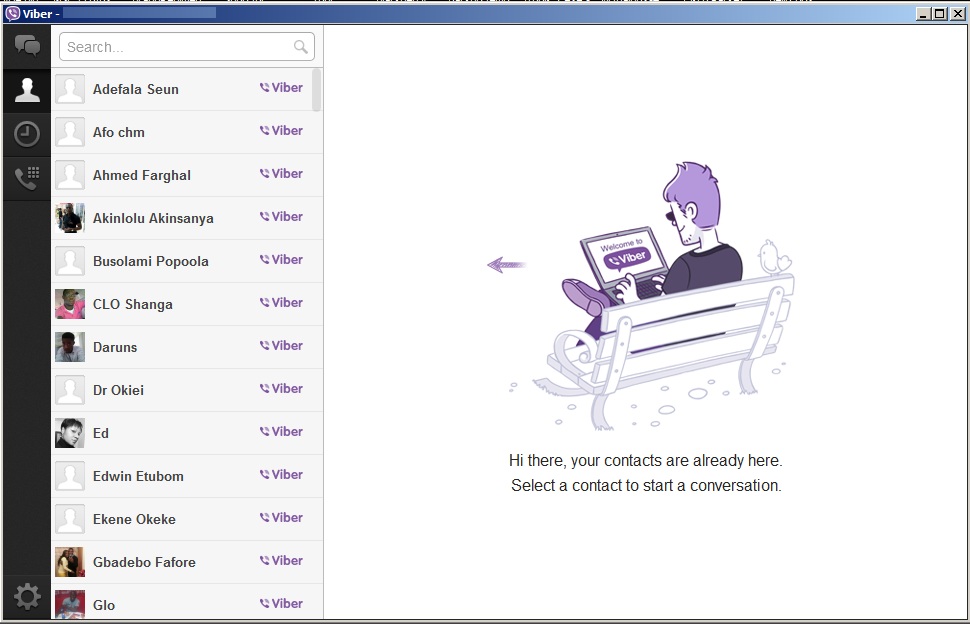
7.  Immediately, all your contacts on your smartphone Viber will show up and then you can select and start chatting or calling as you desire.


Finally, the Viber icon will show up on your desktop and you can start using it immediately.
If you find it helpful, drop your comments below
Read More..

Review Xbox 360 Wireless Controller for Windows


Love gaming with your PC? Wishing there are controllers that works seamlessly with your games? While you are at it, why not make it you additional controller to use for your Xbox 360. The high price-point might discourage people from purchasing this controller for a quick buy, but for those who has been playing the Xbox 360 for a long time or simply love the build quality might consider this a good buy.

First Impression:
Hopefully at this point you have seen a regular Xbox controller, that being said the controller is practically the exact model like the ones you get for free. However, when you purchase this particular controller, you get a USB device that allows your Xbox to connect to your PC. Just in-case someone never seen an Xbox 360 controller before, to my opinion it is a very ergonomic controller; when you wrap your hands around the controller, your fingers will fall easily to the buttons. Solid build quality and weight gives user a great feel of the controller.

Test Drive:
The setup was very easy, insert disc, plug the USB device, connect your controller. BAM! The next thing you know, you are already in the game killing some virtual monsters. The software installed from the disc is very light, and barely noticeable running in the background. The software will only lets you connect your Xbox controller and gives notification if it ever gets disconnected or low on battery. NOTE: Software will not allow you to map your buttons.


Although I cannot map the buttons, the Xbox controller works at ease with games that are build with a controller option available. To test the controller out, I purchased Darksiders II from Steam (claiming that this game is controller enabled). One word: Amazing - the moment the game started it adjusted it self to the controller. I felt like I was playing a native Xbox game; there was no connectivity issue and the controller was very responsive.

Conclusion:
Build quality, easy setup and great compatibility give this controller an edge. Xbox 360 Wireless Controller for Windows is great to have if you have an Xbox and tend to play some PC games that plays better with a controller; given this circumstances, then it is a great deal as you have 1 controller for 2 devices. However, as a stand-alone controller the $59.99 price point maybe a bit high as an investment to play 1 or two games.


Tip:
  • To turn off the controller, simply leave it idle - it will disconnect by it self.
  • The Xbox 360 controller will always sync with the last device connected (either PC/Xbox)
Read More..

Blog Archive

Powered by Blogger.